
Where Autonomous Mowing Fits a Landscaping Route
Start with the mowable acreage you can standardize across recurring client visits, not the total property size. The strongest deployments are repeatable open lawns with a known service window and a crew available for detail work.
A landscaping company should treat a robotic mower as another route asset, not as a replacement for every task on a property. Open acreage, broad commercial lawns, apartment-community greens, school perimeters, and large residential panels are the autonomous-cuttable core. Beds, ornamental islands, narrow side yards, pool surrounds, loose mulch, and customer areas that change week to week remain human work.
- Open recurring acreage. Put 60–80% of a suitable client property’s mowable lawn into mapped zones when the turf is broad, access is predictable, and a daily or near-daily cut improves the finish. Validate that percentage site by site; a property with many beds can have a much smaller autonomous share.
- Detail landscaping zones. Keep bed edges, tree wells, decorative gravel, water features, play areas, steep drop-offs, and tight gate transitions outside the autonomous boundary. A robot maintaining the middle of a lawn gives the crew more time for the work customers actually notice at close range.
- Client-specific finish. Record each customer’s preferred cut height, quiet hours, irrigation schedule, pet rules, access windows, and no-go areas in the site record. A consistent route is only valuable when it produces the agreed finish without surprising the client.
Do not promise a hands-off property before a supervised trial. Walk the full boundary after rain and after irrigation, test gates and narrow passages, and confirm that the mower can return to its dock from every zone. If the route depends on a worker moving a dock or opening a gate every visit, it is not yet an autonomous route.
Route-Planning Workflow Across Client Properties
Build one repeatable site record for every client. The route plan should be useful to a new crew member who has never visited the property.
1. Intake the property
Measure actual mowable acreage, identify the service window, note gates and access roads, photograph hazards, and separate broad lawn from detail landscaping. Confirm who owns the power, Wi-Fi/cellular access, water, and secure storage at the dock.
2. Map the reference plan
Choose a fixed RTK reference-station position with clear sky view, or verify the platform’s per-field navigation approach. Check cellular reliability under tree canopy and beside buildings before drawing virtual boundaries.
3. Split multi-zone boundaries
Map lawn panels separately instead of making one giant polygon. Give each zone its own cut height, schedule, access corridor, exclusion zones, and priority so a crew can pause one client area without stopping the full fleet.
4. Place and test docks
Put the charging dock on a level, drained, visible surface with power, service access, and a reliable approach. Test the return path from the farthest zone and leave enough clearance for a person to inspect the mower safely.
5. Run a supervised first cut
Start at low speed or a reduced schedule. Follow the mower around gates, slopes, tree lines, and crossings; mark every stop cause and adjust the map before turning on recurring automation.
6. Publish the site card
Record unit ID, dock and reference-station location, zone order, access code, customer contact, cut height, weather rule, last service, spare parts, and the person who approved the route.
Large-Site Mowing Runbook
A runbook keeps the fleet operator and the field crew aligned when a client property spans several acres or several zones.
- Before dispatch: review weather, open alerts, battery state, the last route exception, and the customer’s access window. Do not send a crew into a route that was mapped before a major landscape change.
- At arrival: unlock the site, walk the boundary, remove toys, hoses, branches, balls, and pet waste, and confirm irrigation is off. Check that gates are latched open or that the unit is scheduled only for areas it can access.
- Start the priority zone: launch the broadest or most time-sensitive lawn first. Watch the first boundary loop and the dock return; only then release the remaining zones or the second unit.
- Protect live activity: pause the unit for pedestrians, dogs, deliveries, events, or client visits. Use the app schedule and a physical site sign where appropriate, but never treat a sign or obstacle sensor as a substitute for a human check.
- Close the visit: confirm every required zone completed, inspect the deck and charging contacts, photograph any issue, restore gates and client areas, and update the site log with the next action.
For a multi-client contractor, separate “route complete” from “property complete.” A mower can finish its mapped acreage while the crew still owes edging, bed cleanup, pruning, blowing, or an inspection of the exclusions. The job is complete only when both the autonomous and human portions are signed off.
Crew Handoff and Check-In Process
The handoff is where autonomous equipment becomes an operational system. Use the same short checklist on every property and keep the record with the unit, not in one operator’s memory.
Outgoing crew: leave a useful state
Log the unit ID, battery percentage, completed zones, open alerts, blade condition, dock status, weather pause, gate position, debris found, and any client instruction. Attach a photo when the condition is not obvious from the app.
Incoming crew: verify before launch
Read the site card, compare the app state to the physical mower, walk the boundary, inspect the dock, and confirm exclusion zones. Start a short supervised segment before enabling the full schedule.
Fleet operator: own exceptions
Review route failures, low-battery returns, cellular gaps, repeated obstacle stops, and missed zones each morning. Escalate a map change or mechanical issue instead of asking a field crew to repeatedly work around it.
Customer-facing closeout
Tell the account manager what was cut, what remained human work, and whether weather or access changed the plan. A clear note prevents a customer from assuming the mower replaced edging or detail service.
Slopes, Obstacles, Weather, and Exclusion Zones
Safety is a mapping and operating discipline, not a feature checkbox. Use the manufacturer’s slope figure as an upper limit, then leave margin for wet grass, cross-slope travel, transitions, and a loaded deck.
- Slopes: measure sustained grades and transitions, not just the steepest short section. AWD is useful for slope-heavy properties, but keep the route away from drop-offs, loose mulch, slick paving, drainage swales, and slopes the mower cannot approach squarely.
- Tree canopy and buildings: inspect RTK visibility along the full route, especially under mature trees and between buildings. If the signal drops repeatedly, shorten the zone, improve the reference-station position, or choose a platform and route design with a more reliable fallback.
- Gates and narrow passages: map the usable opening, not the nominal gate width. Account for posts, hinges, uneven thresholds, and a person who must safely move through the same passage. A route that needs manual gate intervention belongs on the crew schedule.
- People, pets, and debris: schedule around occupied areas and use physical procedures for dogs, children, toys, hoses, branches, balls, and lawn furniture. Pause the mower when a property changes; do not assume obstacle avoidance will identify every soft or low object.
- Weather and irrigation: set a rain and dry-out rule that protects turf and traction. Inspect after storms, irrigation cycles, and heavy leaf fall; wet clippings and debris can turn a reliable route into a repeated stop-and-return loop.
Fleet Maintenance That Fits a Contractor Schedule
A service log turns small checks into predictable uptime. Assign one person to review the log even when different field crews perform the physical inspection.
Daily: clear and confirm
Inspect the underside, deck, blades, wheels, lift/tilt sensors, charging contacts, and visible body damage. Remove wet clippings and debris, verify the dock is powered, and record battery state and any route alert.
Weekly: clean and audit
Clean the chassis and sensors according to the manual, check tire wear and fasteners, verify boundary/reference-station hardware, review firmware notices, and compare planned versus completed zones.
Monthly: service and trend
Rotate or replace blades before the cut quality drops, inspect batteries and spare units, test the recovery procedure, and review charging time, downtime, repeat stops, and cellular/RTK exceptions.
Keep spares ready
Carry a labeled spare-blade kit, compatible fasteners, cleaning tools, charger or dock parts, and a charged backup unit when the route economics justify it. Record serial numbers and every part change in the service log.
Do not let a “temporary” manual workaround become the fleet process. If a mower repeatedly needs a blade change, a map adjustment, or a dock reset, schedule the repair and quantify the downtime so the next fleet purchase reflects the real operating cost.
Commercial Mower Selection Checklist
Compare the deployment, not just the headline coverage number. Open acreage and detail landscaping zones often need different tools, and a contractor may use both.
| Decision area | What to require | Landscaper’s practical test |
|---|---|---|
| Coverage and fleet sizing | Size from actual mowable acres, growth rate, cut height, route window, and backup capacity. | Model each client’s autonomous acreage separately. Open acreage can justify CEORA-class units; detail zones still need the crew. |
| Multi-zone scheduling and auto-handoff | Per-zone boundaries, schedules, cut heights, charging docks, and a documented handoff behavior. | Test the farthest zone, every corridor, and a return to each dock without a worker moving the mower. |
| RTK and cellular reliability | Reference-station placement, canopy performance, cellular telemetry, and a recovery plan for signal loss. | Walk the route under trees and beside buildings at the same time of day the mower will run. |
| Slope and AWD needs | Usable traction margin, not just the published maximum grade. | Measure wet and cross-slope sections. Reserve AWD for properties where slope risk justifies the narrower coverage trade-off. |
| Obstacle and weather handling | Lift/tilt safety, obstacle behavior, weather resistance, rain pause, and a dry-out rule. | Map people, pets, gates, debris, irrigation, and play equipment as exclusions before the first recurring run. |
| Chassis and IP durability | Sealed construction, washable surfaces, robust deck, replaceable blades, and accessible service points. | Inspect after dew, irrigation, wet clippings, dust, and transport between properties. |
| Fleet software | Per-unit location, battery, alerts, firmware, route history, and role-based access where available. | Have a second operator find a missed zone and export or copy the service history without the primary operator. |
| Transport between client sites | Secure loading, unit identification, dock/reference-station accessories, and a repeatable setup kit. | Time the pack-out and setup. If relocation consumes the labor savings, dedicate units to fixed sites instead. |
| Dealer and service support | Installation, spare parts, response time, software support, and a documented escalation path. | Ask who handles a failed dock, map correction, battery issue, and urgent client call during peak season. |
| Labor, fuel, and insurance ROI | Compare equipment, service, transport, supervision, fuel avoided, labor released, and risk exposure. | Model the autonomous share and the detail crew separately. Do not count labor savings for work the customer still expects humans to perform. |
Use the robotic mower buyer’s guide for the underlying navigation and coverage trade-offs, then bring a measured site plan to a commercial dealer. A good quote should describe zones, docks, service coverage, and exclusions, not only a unit count.
Recommended Mowers for Landscapers
These are deployment examples, not interchangeable product reviews. Confirm the exact commercial configuration, availability, service territory, and client-property fit before purchasing.

Husqvarna CEORA
Broad AcreageBest fit for broad recurring acreage where a contractor wants a purpose-built commercial platform, virtual boundaries, and fleet-level status across large client sites.
- Coverage context
- 6 acres ±20% Husqvarna lawn-size rating; not a per-charge promise.
- Navigation
- EPOS RTK-GNSS with a reference station and virtual boundaries.
- Fleet software
- Husqvarna Fleet Services with cellular telemetry and FOTA updates.
- Slope context
- 20% inside the installation and 15% at the virtual boundary.
- Best caveat
- Use a detail crew for beds, tight corridors, and properties where the reference-station plan is weak.
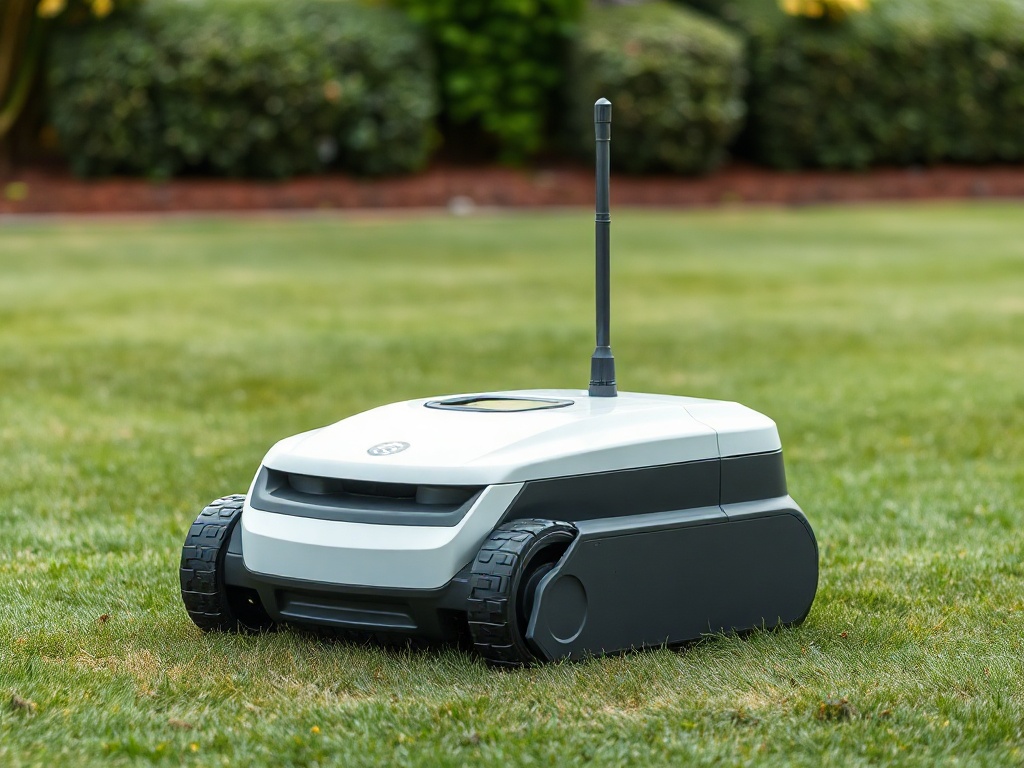
Kress Mission Mega
Multi-Zone FleetBest fit for contractor fleets that need RTKn multi-zone routing, a large scheduled-area rating, and a documented rain-sensor pause across recurring properties.
- Coverage context
- 6 acres recommended every 48 hours; 9 acres maximum every 72 hours. Schedule rating, not per-charge.
- Navigation
- RTKn wire-free navigation with a reference network and virtual boundaries.
- Fleet software
- Kress Mission app with multi-unit fleet management.
- Slope context
- Up to 40% (22°) on the manufacturer rating; verify the route and surface.
- Best caveat
- The Mission Mega review link is an adjacent Kress model, not an exact Mission Mega review.

Husqvarna Automower 535 AWD
Slope HeavyBest fit for slope-heavy client properties, banks, and woodland-edge lawns where all-wheel drive and boundary-wire reliability matter more than large-area RTK throughput.
- Coverage context
- 1.25 acres ±20% Husqvarna lawn-size rating; not a per-charge promise.
- Navigation
- GPS assist is listed, but mowing navigation uses boundary and guide wires rather than RTK.
- Fleet software
- Husqvarna Fleet Services and Automower Connect, connectivity-kit dependent.
- Slope context
- Up to 70% (35°) with all-wheel drive; wet conditions still need route margin.
- Best caveat
- It is a smaller, boundary-wire AWD fit and not an exact substitute for CEORA on broad acreage.
Three Landscaper Deployment Scenes
The equipment choice follows the site pattern: open recurring acreage, a multi-zone route, or a slope-heavy property with a human detail crew nearby.

Map the broad lawn as a recurring zone, keep beds and edges with the detail crew, and use a daily-cut schedule that leaves the property consistently finished between visits.
Separate front lawn, rear lawn, and common-area boundaries so the fleet operator can pause one client zone while a crew works nearby or a customer holds an event.
Let an AWD unit cover the safe slope band while the crew handles drainage transitions, gate approaches, tree wells, and any area where a route margin is not dependable.
Frequently Asked Questions
Treat every client property as a separate site record. Walk the mowable perimeter, mark hazards and exclusion zones, verify the RTK reference-station or cellular coverage plan, map each lawn panel as its own zone, and test a slow boundary pass before assigning a recurring schedule. Record dock location, gate access, cut height, customer contact, and the last successful route in the fleet log.
The outgoing crew should report the property, unit ID, battery state, completed zones, open alerts, blade condition, weather pause, gate or dock status, and any new debris or pets. The incoming operator checks the app against that note, performs a perimeter walk, confirms the exclusion zones, starts a short supervised run, and records the handoff time and customer-specific instructions.
Use an AWD platform only where its tested slope rating gives usable margin, and keep the mower away from drop-offs, wet transitions, loose mulch, ponds, and unsupported cross-slopes. Map trees, play equipment, irrigation heads, boulders, hoses, dog areas, gates, and pedestrian paths as exclusion zones. Never rely on obstacle avoidance as permission to run around people, pets, toys, or debris; pause the schedule and inspect the site first.
At every daily check, inspect the deck, blades, wheels, charging contacts, sensors, and underside for wet clippings or debris. Weekly, clean the chassis, verify boundary and dock hardware, check tire wear and firmware alerts, and review route exceptions. Monthly, rotate or replace blades as needed, test batteries and spare units, audit service records, and review charging and downtime trends with the fleet operator.
Choose Husqvarna CEORA for broad recurring acreage and a commercial fleet dashboard, Kress Mission Mega for large multi-zone contractor programs that benefit from RTK routing and a documented rain-sensor pause, and Husqvarna Automower 535 AWD for slope-heavy detail properties where traction matters more than wire-free RTK. These are deployment fits, not guarantees; confirm the exact configuration, service coverage, access route, and site conditions with a dealer.